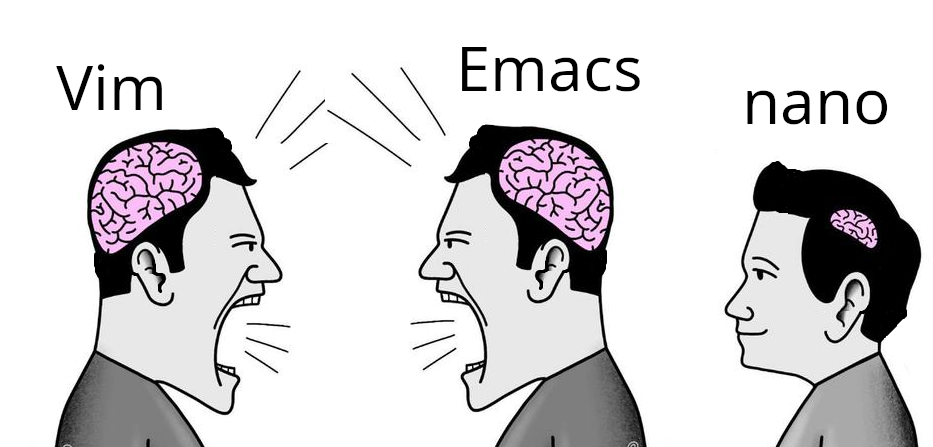
me like use nano. nano say how do thing. nano exit easy.
Micro for the win
Lol, you losers don’t use ed to edit your files?
nano gang represent😎
I actually prefer micro
I can use Vim, it was the choice for years. But I actually like using nano because it’s what I need and all I need.
I pressed 6 while holding shift, then x. But it just typed ^x in my file.
Maybe I need to swap black and white as I type them, but I don’t know how to do that.
I think M is meta/alt
I’m not typing all that in. No wonder emacs users are angry all the time.
rofl
I no understand nano. I hate key combinations
JOE is over in hospice care
I’m standing up for joe!
I was thinking about this. Pico is probably sitting next to him watching golden girls reruns.
micro enters the chat.
Static, portable binary with no dependencies.
Out of the box:
- Syntax highlighting
- Multi-line cursors like Sublime Text
- Mouse support (works incredibly well)
- Splits and tabs for working on multiple files
- Diff gutter
- Copy and paste with system clipboard
- Cross-platform (runs basically on anything that Go does)
- Sane key binds (ctrl-s, ctrl-c, ctrl-v, ctrl-z, ctrl-x, etc)
- Terminal emulator
- Plugin system to extend it
- And much much more
I have nothing to do with the project but this binary is the absolute best. curl or wget to any host and away you go with effectively a Sublime Text / VSCode like in the terminal. It’s as simple as nano and as functional as a well configured and extended vim.
It’s baffling it’s not more well known and not installed by default on major distros.
That’s not a text editor, that’s an IDE.
IMO it needs better LSP support and things like refactoring, smart auto completion, and go to definition for a range of languages to be considered an ide.
But you can edit text with it.
And emacs is an operating system 😂
And vim is a way of life
I’m glad we all agree that nano is the one true text editor.
/s
If only I could get copy paste working when using micro over ssh. inside a document it works fine but I can’t get it to put stuff on my system clipboard
to use the system clipboard I select with the mouse while holding shift, then do ctrl-shift-c iirc. That’ll use the terminal emulator highlight and the system clipboard. At least on my machine, using kitty. Idk all the pieces that need to be in place for this to work.
How many Linux distros include micro in their minimal image? Vim, emacs, and nano are good because I can connect to just about any container or Linux VM and expect to have all of them available.
Let’s say I have a test that always passes on my machine but fails in CI. If I can get a terminal on the test runner, I can open up my test code in vim, add extra logging and error handling, and rerun the test to check my fix.
I am not going to install additional editors in a VM that will be recreated next time I push a code change. If I am setting up a development environment for long term use, I will install my favorite IDE and configuring all the bells and whistles.
the same old argument that anal sex is good because it works on more people
you might appreciate it, but being preinstalled is not the selling point you think it is. I spend hundreds of times longer in the editor than installing it. I want something good while I’m using it. I don’t care if it takes me 30 seconds to install, and maybe no one should.
I use nano because I can’t be assed to memorize key bindings, but I’ll give this a go
Hahaha
Memorize
Okay guess what the keybind for Copy is in micro
Go on, guess
YEAH THAT’S RIGHT IT’S CONTROL+C
Now guess what Paste is
YOU GOT IT
Quit? Find? Undo? Save? Open?
If you guessed anything weird, that’s on you.
My only complaint is that Ctrl+N is “find next” instead of Ctrl+G, but you can remap keybinds at will, so it’s not that big of a deal.
I first ran into nano when I gave Gentoo a try. I had to edit a few config files, so I ran vi… no vi. Emacs? No Emacs. Well, shit, what am I supposed to do? So I went back a bit and read more carefully, apparently there was a thing called nano.
So I ran that. Ew. It was a clone of an old DOS editor of all things. What kind of lunatic had ported that? Anyway I managed to do my edits with it, added normal editors to the system and was on my way.
It was also the last time I used it.nano is the perfect editor for people who only use editors in the terminal, once in a while to edit a config file.
I don’t think it’s the perfect editor for anything. They’ll have to use vi sooner or later, they might as well learn the basics. Or just use kate.
I’ve been using linux for 25 years and I can count the number of times I used vi to actually edit something on one hand. They will not “have to use vi sooner or later.”
It’s OK not to like and not use nano. It’s also OK to like and use nano.
It’s fine if you only use your own machine. I suppose having accounts on other boxes is less common nowadays, but there’s much less guarantee to find your comfort editor there.
Also a 30 year+ linux/unix user.
Use Kate in command line over ssh?
Ssh - X
Then run kate, easy :)
But I don’t have a DE installed! :p
“I hated using it”
“But you have used it, yes?”Well, yes. But I did wash my hands afterwards.
Do they have a sink in eMacs now?
When I was first learning how to code I was working on some beginner project and couldn’t figure it out. I asked a friend who knew a few things what I was doing wrong and he hopped on my computer, fixed the code then opened it in vim and told me my project wasn’t working because of whatever text editor I was using (I think sublime). So for like a year I hardly learned how to code but I got pretty dang good with vim.
Nano or as I like to call it “The Sudo Editor”
VIsudo -> opens nano ¯\_(ツ)_/¯
I love nano. I used to do tech support for a Linux-based content management system (before SAaS take took off)… The customer sysadmins were sometimes whichever engineer was volun-told to do it, so competency varied wildly.
I helped mostly with installs. This might be the poor newbie sysadmin’s first time on the command line. Nano was my go-to suggestion for editing config files–all the commands are right there! Much less intimidating than vi or emacs for a newbie.
Nano you can pick up in ten minutes and master in an afternoon. By that time you’re still reading the intro to vim or eMacs.
Ed users are vim lusers on steroids.
Fortunately, every computer comes equipped with an “exit editor” button. It’s on the back, attached to the power supply unit. You just flick the switch. Exits every editor known to humanity. /j
Ah, the famous NCIS way of exiting editors.
Thanks, I hate it!
nano is usually built in. Adding another one is just redundant if all you’re using it for is editing an occasional config file.
Honestly never understood the hate for it. Who cares? Petty, stupid, nerd-wars over little crap like a text editor is the reason average people don’t even consider linux.
I very rarely see people hate nano (except a few comments in this thread), and I always see nano recommended as the text editor when people give advice on doing things in the command line
I see vim preinstalled more than nano (e.g. in container images). I’ve been trying to convert to micro, though. It has better support for terminal emulators than nano.
Honestly nano is perfect for quick edits. Vim and Emacs are powerful, but sometimes you just want to open a config file, change one line, and exit without fighting the editor. 😄
This is what i use vim for. Vim doesn’t necessarily have to be a full blown ide with 30 plugins
Vim does not just work if you don’t know how to get into edit mode and save and quit from there. Nano even has built in search and replace.
Funny story, when i first got into linux (almost a decade ago), I accidentally opened nano pasting some random command off the internet and didn’t know how to close it because I didn’t know what the ^ symbol meant.
I had successfully been quiting (and using) vim for a few months at this point.